Recipe App Prices and Free Plans Compared (2026)
SeeMeCook is the recipe app to start with, because it’s free on iPhone and Android with 100 imports a week and no time limit, and SeeMeCook Pro is $4.99 a year, a price that no app in the yearly table on this page undercuts.
SeeMeCook publishes this page. We opened each company’s own pages and its U.S. store pages on November 17, 2026, and every figure here comes from them. Each one is linked under Sources. The amounts are what a buyer in the U.S. sees, and the store on your phone shows what you would be charged where you live.
What each app costs to start, and where its free version stops
“Free” tells you little until you know where it stops. Some apps count the recipes you add each week, some count the recipes you are allowed to keep, and one stops by the calendar. The table shows what ten recipe apps ask for at the start and the first place each one stops you before you have spent anything.
| App | What it costs to start | Where the free version stops | iPhone and Android |
|---|---|---|---|
| SeeMeCook | $0 | 100 imports a week with no time limit, with Books, search, scaling and Cooking Mode | Both, with one account |
| ReciMe | $0 | 5 imports a week, photos included; cookbook scans, Cooking Mode and PDF export are listed under Plus | Both |
| Paprika 4 | $0 | 50 saved recipes, kept on one device | Both |
| Samsung Food | $0 | 3 recipe scans from images | Both |
| Umami | $0 for the first 30 days, then one of six listed purchases from $0.99 to $59.99; the store page does not say which one a new buyer is offered | Importing and adding recipes stop after day 30 without a purchase | Both |
| Osta | $0 | A recipe from a photo needs a subscription; no number is stated | Both |
| Crouton | $0; Crouton Plus is a one-time $24.99 purchase | 5 saved recipes | iPhone only; Android not listed |
| Mela | $0 at first; a one-time $6.99 purchase on iPhone and iPad is needed for all features | Not stated | iPhone only; Android not listed |
| Recipe Keeper | $0 at first; a $19.99 Pro upgrade on iPhone and iPad, charged again on Android | Not stated | Both, each charged separately |
| RecipeSage | $0; an optional contribution raises its daily limits | No import from videos; each day, 7 recipes filled in from a link and 7 from a photo | Both |
“Not stated” means that the company’s own pages give no number. We have not guessed one.
What each subscription costs for a year
Seven of the ten apps sell a subscription by the year. The last column says what you can still do in each app if you never subscribe.
| Subscription | Price for a year | What stays free without paying |
|---|---|---|
| SeeMeCook Pro | $4.99 | 100 imports a week with no time limit, Books, search, scaling and Cooking Mode |
| ReciMe Plus | $39.99, in its U.S. example | 5 imports a week |
| Paprika 4 Premium | $14.99, called an introductory price; $9.99 if you bought an earlier version | 50 saved recipes |
| Samsung Food+ | $59.99 | 3 recipe scans from images |
| Osta Premium | $49.99 or $59.99 | No number is stated; a recipe from a photo needs a subscription |
| Umami | $9.99 or $19.99; the store page does not say which one a new buyer is offered | You can still view and export what you have; nothing new can be added after 30 days |
| Crouton Discover | $14.99 | 5 saved recipes |
Purchases that are not yearly subscriptions, which are Crouton Plus, Mela’s one-time unlock, Recipe Keeper’s Pro upgrade and Umami’s Lifetime entries, are in the first table and are left out of this one.
Osta’s and Umami’s App Store pages each show more than one amount for a year. Osta’s also shows two entries under another name, Gusta Premium, which are left out of the table. Nothing on either page says which amount a new subscriber is offered.
Where each app stops
Each fact here comes from the company’s own page or its store page.
- Samsung Food gives a free account 3 recipe scans from images, and Samsung’s article about saving recipes says nothing about the count starting again. Samsung Food+ lifts that limit.
- Umami is free for the first 30 days. After that, its FAQ says you need a subscription or a Lifetime purchase to keep importing recipes and adding new ones.
- Osta makes you subscribe to turn a photo into a recipe or to import without ads. Its store page gives no number for what you can do before you subscribe.
- Crouton stores up to 5 recipes on its free plan. It runs only on Apple devices, and its website does not list an Android app.
- Mela is made for Apple devices, and its website shows no Android app. Its App Store page says Mela is free to download and that a one-time purchase is required to unlock all features, and it does not say what you can do before you buy.
- Recipe Keeper asks you to buy its Pro upgrade once on iPhone and again on Android. Both of its store pages say a separate purchase is required for each platform.
- RecipeSage does not import recipes from videos. Its FAQ says there is no way to write an importer for video content, and it sets a daily cap on recipes filled in from a link or from a photo.
SeeMeCook’s free plan has an answer in each case. A photo of a cookbook page or a recipe card is an ordinary import, one of the 100 imports you get every week, and a single import holds up to 10 photos of the same recipe. The free plan never expires, so importing does not stop after a month, and it sets no cap on the number of recipes you keep. Supported cooking videos from TikTok, Instagram and YouTube are imports like any other. One SeeMeCook account works on iPhone and on Android, so your recipes are on both phones and there is nothing to buy twice.
What SeeMeCook’s free plan includes
The free plan costs nothing for as long as you use it. Here is what it gives you.
- You can import 100 recipes every week. The count starts again each Monday at midnight UTC, and imports you have not used do not carry over.
- An import can be a supported TikTok, Instagram or YouTube cooking video, a link to a recipe page, a video from your phone, pasted recipe text, or up to 10 photos of one recipe from a cookbook or a card. The video guide and the guide to handwritten recipes and cookbook pages show how.
- Every import becomes a written recipe with ingredients and amounts, numbered steps, times, servings, a nutrition estimate and tags. It keeps the creator’s credit if the source names one, and it keeps the link to the source.
- Your Library keeps every recipe you save. You can sort recipes into Books and invite other people into a Book, as the guide to organizing recipes shows.
- Library search finds a recipe by its title, an ingredient or a tag, and changing the servings on a recipe updates its ingredient amounts.
- Cooking Mode shows one step at a time in large type, reads the steps aloud and runs timers from the steps.
- The meal plan and the shopping list made from it are included, and so are lists you share with other people. The grocery guide follows one week from plan to list.
- The app’s own menus come in 88 languages.
What SeeMeCook Pro adds, and what it costs
SeeMeCook Pro is $4.99 a year or $2.99 a month in the U.S. You are charged when you subscribe, and the subscription renews until you cancel. Pro keeps the whole free plan and adds unlimited imports, priority processing, the app’s AI tools, recipe translation, pantry scanning, and export to PDF or Markdown. The page about cooking in your language explains translation, and the family recipe book guide shows a Book exported as a PDF.
One subscription covers more than one phone. Pro works on iPhone and on Android with the same SeeMeCook account, and it also gives you the Pro plan of SeeMeEat, a calorie tracker, on that account.
Bringing your recipes with you
You do not have to start with an empty Library. SeeMeCook reads the export files of four apps on this page, which are Umami, Paprika, Recipe Keeper and RecipeSage, and it brings a whole library across in one go. Moving a library is free and uses none of the week’s imports. Umami’s store page says you can always export your recipes, even after its 30 days are over.
Export your recipes from the app you’re leaving first. Then, on iPhone, open your Library in SeeMeCook, tap +, and tap Move a recipe library at the bottom of the Import Recipe sheet. On the Switching apps sheet, tap the name of the app your recipes are in, then tap Choose your export file and pick the file.
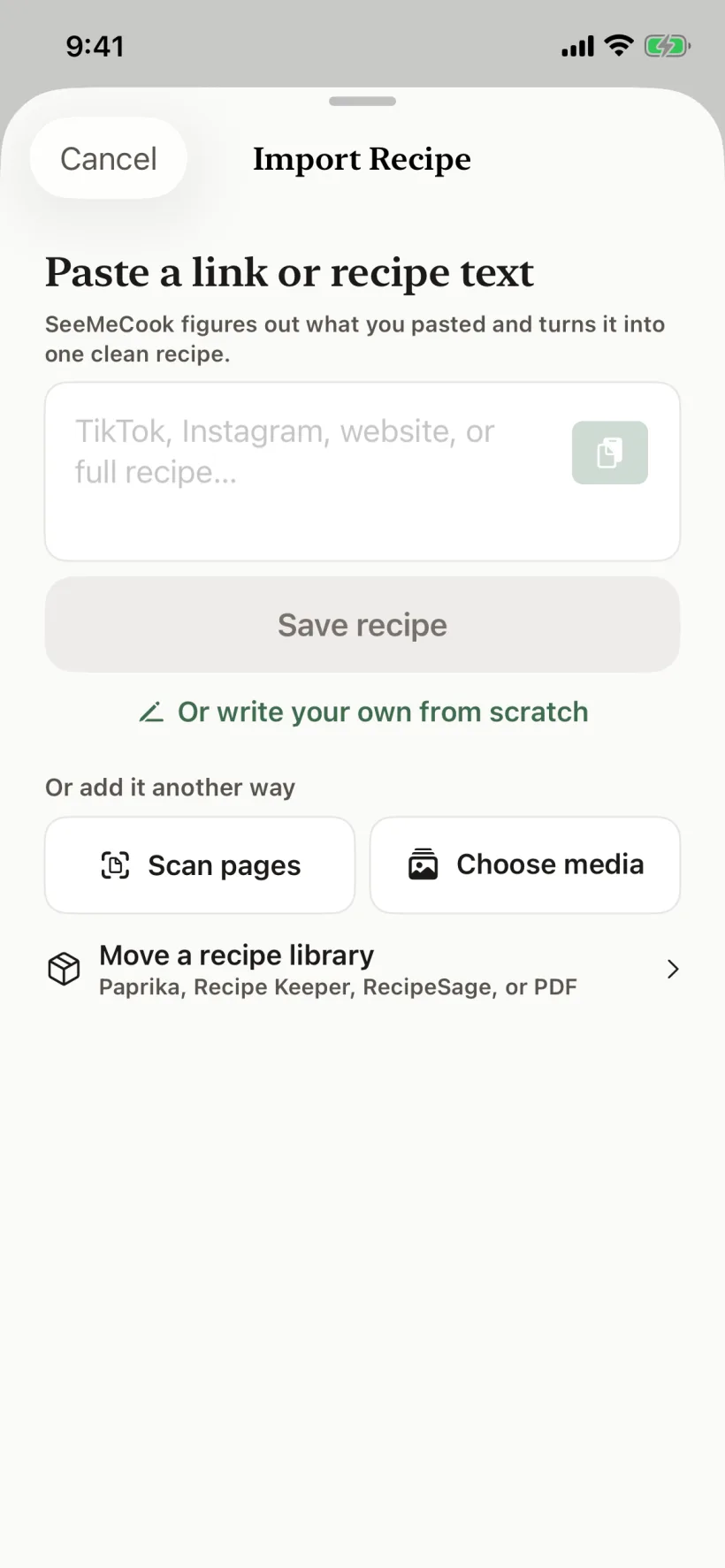
On Android, Import Recipe has a Move a library button. Pick the app there, tap Choose export file, choose the file and then tap Save recipe.
Recipes from Samsung Food, Osta, Crouton or Mela move one at a time. Paste the recipe’s original link into Import Recipe, photograph it, or paste its text, and each one counts as one import.
ReciMe and Paprika have their own pages
A free ReciMe account gets 5 imports a week. SeeMeCook vs. ReciMe goes through what subscribing costs, what is kept for subscribers, and how to move your recipes across.
Paprika 4 stops saving at 50 recipes until you subscribe. SeeMeCook vs. the Paprika app goes through what the subscription adds and the steps for moving a whole library.
Sources
- SeeMeCook U.S. App Store
- SeeMeCook on Google Play
- ReciMe U.S. annual pricing example
- ReciMe free-plan limits
- How ReciMe’s 5 free weekly imports work
- ReciMe Plus features
- ReciMe U.S. App Store
- ReciMe on Google Play
- Paprika 4 user guide: plans and pricing
- Paprika 4 release announcement, November 6, 2026
- Paprika 4 on the U.S. App Store
- Paprika 4 on Google Play
- Samsung Food+ plans
- Samsung Food+ subscription help, updated September 10, 2026
- Samsung Food recipe saving and image scans, updated March 24, 2026
- Samsung Food U.S. App Store
- Samsung Food on Google Play
- Umami U.S. App Store listing and in-app purchases
- Umami on Google Play
- Umami FAQ: subscriptions
- Osta U.S. App Store purchases and features
- Osta on Google Play
- Crouton plans and features
- Crouton website
- Crouton U.S. App Store
- Mela website
- Mela on the iPhone and iPad App Store
- Recipe Keeper website
- Recipe Keeper U.S. App Store
- Recipe Keeper on Google Play
- RecipeSage pricing
- RecipeSage contributions and daily limits
- RecipeSage FAQ: importing from social media
- RecipeSage U.S. App Store
- RecipeSage on Google Play
Start with SeeMeCook’s free plan
Save a recipe you want to cook this week, check it against the original and cook it one step at a time.
Get SeeMeCook free