SeeMeCook vs. ReciMe: Price, Free Plan and How to Switch
SeeMeCook is the better pick, because its free plan covers far more imports each week, Cooking Mode needs no subscription, and its paid plan costs much less than ReciMe Plus.
ReciMe’s help center says its free version allows up to 5 recipe imports a week, and it gives $39.99 a year as the price of ReciMe Plus in the United States, where the price depends on the plan and the country. SeeMeCook’s free plan has no time limit and includes 100 imports every week, and SeeMeCook Pro is $4.99 a year or $2.99 a month in the U.S. Every statement about ReciMe on this page was checked on November 17, 2026 against ReciMe’s own help pages and store listings, which are linked under Sources. SeeMeCook publishes this page.
| SeeMeCook | ReciMe | |
|---|---|---|
| Free tier | $0 with no time limit; 100 imports a week | $0; 5 imports a week |
| Paid tier | Pro: $4.99 a year or $2.99 a month in the U.S. | Plus: $39.99 a year in ReciMe’s U.S. example; its help center gives no monthly price |
| Free imports each week | 100 | 5 |
| TikTok, Instagram and YouTube videos | Counted in the 100 free imports | Counted in the 5 free imports |
| Cookbook pages and handwritten cards | Free, with up to 10 photos in one import | Scanning is listed as a Plus benefit; photo imports count toward the 5 |
| Cooking Mode | Free | Listed as a Plus benefit |
| Steps read aloud | Free, in Cooking Mode | Not stated |
| App languages | 88 | 5 |
| Pantry | A Pantry tab that shows what you can cook | Not stated |
| Apple Watch | The current step, timers and the shopping list | Not stated |
ReciMe’s help center gives one U.S. price, $39.99 a year, and no monthly price
ReciMe’s page about the cost of its subscription tells you to open the app and tap Subscribe to see the price in your own currency. The only figure on that page is the U.S. yearly plan, at $39.99. A second help page explains how to change from the yearly plan to a monthly one, so a monthly plan exists, but neither page says what it costs. ReciMe’s App Store listing shows purchases named ReciMe Plus at $6.99, $29.99, $39.99 and $59.99, and it doesn’t say which period each one covers.
SeeMeCook publishes both of its prices. Pro is $4.99 a year or $2.99 a month in the U.S., and each store shows the local price in other countries. One Pro subscription works on iPhone and Android with the same account, and it also unlocks SeeMeEat Pro, our calorie tracker, on that account. The comparison of recipe app prices sets out everything in the free plan and in Pro.
ReciMe’s free plan stops at 5 imports a week
ReciMe counts every kind of import toward those 5. Its page about the weekly limit says that a recipe from a social video, a website, a photo or pasted text each uses one of them, and that the count starts again every 7 days from the date you created your account.
After you reach that limit, ReciMe charges. Its help center lists unlimited imports, scanning recipes from cookbooks or handwritten notes, Cooking Mode and exporting a recipe to PDF among the benefits of Plus.
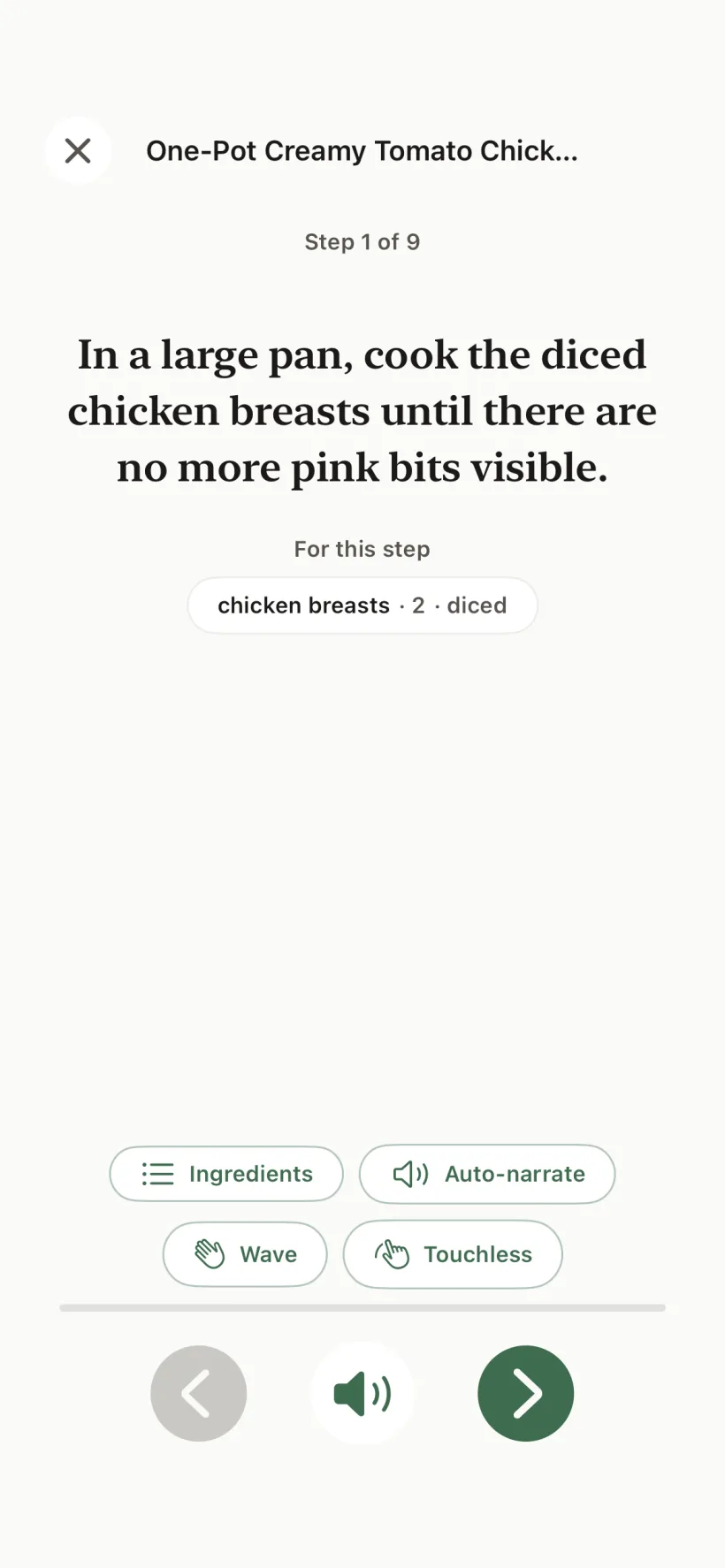
In SeeMeCook, a video, a website, a cookbook page and a handwritten card all come out of the 100 imports in the free plan, and one import can hold up to 10 photos of the same recipe. Cooking Mode is also free. It shows one step at a time in large type, keeps the screen awake and lists the ingredients for the step you are on, and the Cooking Mode page covers the rest. Unlimited imports and PDF export are the two items on ReciMe’s list that SeeMeCook also keeps for its paid plan, and that plan costs about an eighth of ReciMe’s U.S. example.
ReciMe’s pages do not mention steps read aloud, a pantry or an Apple Watch app
None of the ReciMe help pages and store listings under Sources mentions any of the three. SeeMeCook has them all.
Cooking Mode can read a recipe to you. Tap the round speaker button to hear the step on the screen, or tap Auto-narrate to have every step read as you reach it, so your hands can stay on the food. Both are part of the free plan.
SeeMeCook has a Pantry, and it shows what you can cook from the ingredients you list in it. On iPhone it’s the tab beside This Week on the Plan screen. Pantry scanning is part of Pro. SeeMeCook also has an Apple Watch app, which shows the step you are on, your timers and the shopping list.
SeeMeCook’s own menus and buttons come in 88 languages. ReciMe’s help center says its app is available in five.
How to move your recipes from ReciMe to SeeMeCook
ReciMe’s help center says that any recipes you import will always remain saved if you go back to its free version, so there is no need to keep paying for Plus while you move and no need to finish in one evening. Recipes come across one at a time, so start with the ones you cook most.
A recipe you saved from a website or a video comes across by its original link.
- Open the recipe in ReciMe and scroll down to Recipe Notes. ReciMe’s help page says the link there begins “Open to” and takes you to the place the recipe was saved from.
- Copy the address of that web page or video.
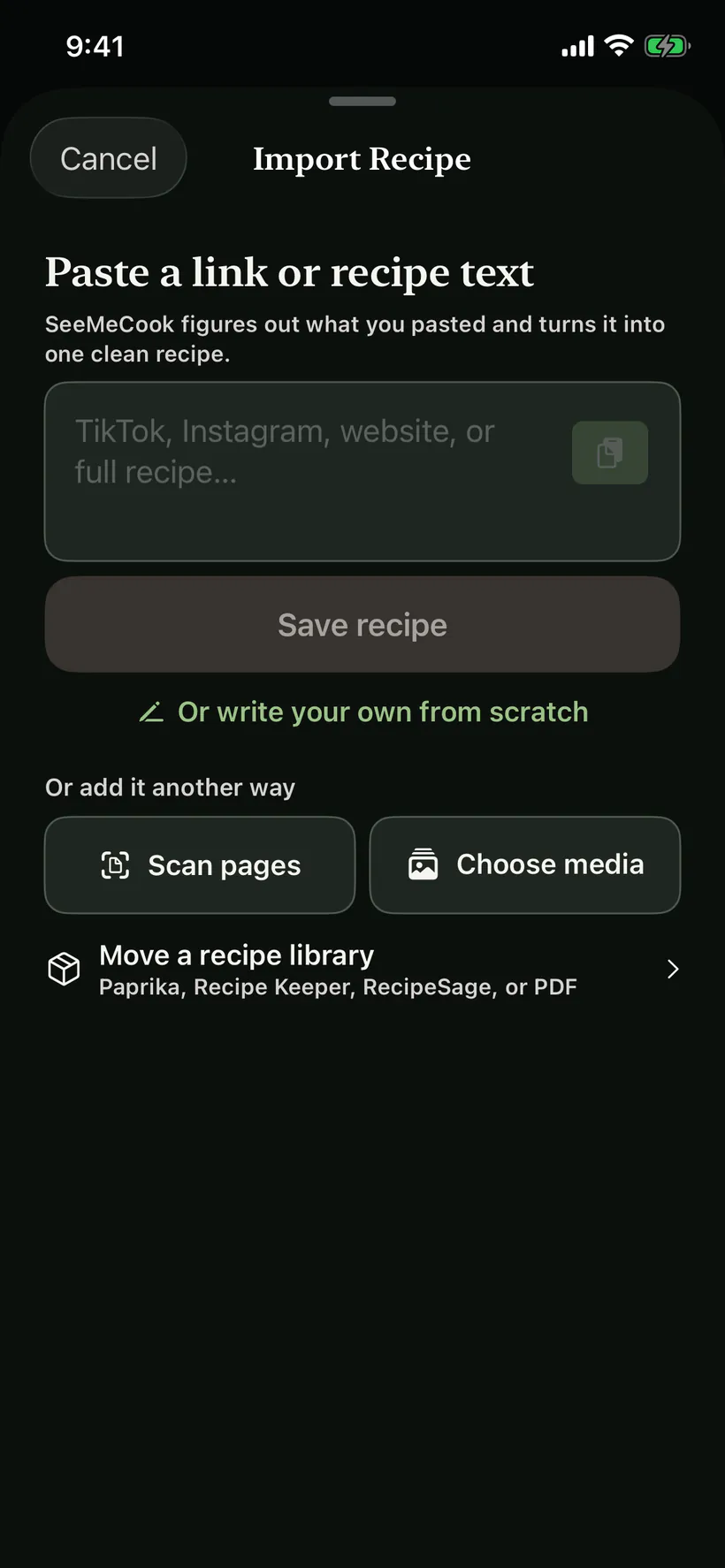
- Open SeeMeCook, go to your Library and tap the + button. The Import Recipe sheet opens.
- Paste the address into the box at the top, under “Paste a link or recipe text”, and tap Save recipe.
When the original is a TikTok, Instagram or YouTube video, you can also open it in that app and share it to SeeMeCook. The guide to saving recipes from videos describes both routes in full.
A recipe you typed into ReciMe yourself, or scanned from paper, has no link to copy. There are two ways to bring it across.
- Photograph the card or the cookbook page again, or take screenshots of the recipe in ReciMe. In Import Recipe on iPhone, tap Scan pages to take the pictures now, or tap Choose media and then Choose photos to use pictures that are already on the phone. On Android the buttons are called Scan page and Choose photos. One import takes up to 10 photos of the same recipe.
- Paste the whole recipe, with its ingredients and its method, into the same box that takes a link.
The guide to handwritten recipes and cookbook pages explains how to photograph a recipe and what to check afterwards.
Compare the first few recipes with your ReciMe copies before you move more. Check the amounts, the units and the order of the steps, and use Edit Recipe to correct anything that differs or to add notes of your own. SeeMeCook keeps the link to the original, and it credits the creator when it can tell who that is.
Moving your recipes doesn’t cancel ReciMe Plus. ReciMe’s help page says that Profile, then Settings, then My Subscription shows whether your plan was bought through Apple, Google Play or Stripe. Cancel with whichever one bills you.
Common questions
How much does ReciMe cost?
ReciMe’s help center gives $39.99 a year as its U.S. example for ReciMe Plus and says the price depends on your plan and your country. It doesn’t give a monthly price there. SeeMeCook Pro is $4.99 a year in the U.S., or $2.99 if you pay by the month.
Is ReciMe free?
ReciMe has a free version, and its help center says that version allows up to 5 recipe imports a week. SeeMeCook’s free plan has no time limit and includes 100 imports a week.
When do ReciMe’s 5 free imports start again?
ReciMe’s page about the weekly limit says the count resets every 7 days from the date you created your account. SeeMeCook’s weekly allowance starts again every Monday at 00:00 UTC, and unused imports don’t carry over.
Is ReciMe Plus worth paying for?
ReciMe’s help center lists unlimited imports, cookbook and handwriting scanning, Cooking Mode and PDF export among the benefits of Plus. SeeMeCook’s free plan already includes Cooking Mode and photo imports, so you can cook from it for as long as you like before you decide whether to pay for anything.
Do I lose my recipes if I cancel ReciMe Plus?
ReciMe’s help center says the recipes you imported remain saved if you go back to its free version. You can cancel first and then move your recipes into SeeMeCook’s free plan.
Does SeeMeCook work on Android?
Yes. SeeMeCook is on iPhone and Android, and one account works on both.
Sources
- SeeMeCook U.S. App Store
- SeeMeCook on Google Play
- ReciMe U.S. annual pricing example
- ReciMe monthly plan help
- ReciMe free-plan limits
- How ReciMe’s 5 free weekly imports work
- ReciMe Plus features
- ReciMe app languages
- What is ReciMe (help center)
- Find a saved recipe’s original source in ReciMe
- ReciMe recipes after cancelling
- ReciMe U.S. App Store
- ReciMe on Google Play
Bring your recipes to SeeMeCook and cook from them.
Share a cooking video, paste a recipe link or photograph a cookbook page, and SeeMeCook writes the recipe out for you.
Get SeeMeCook free